

Description
Fast Text Filler for Web Developers
Download {software_name} now
Overview
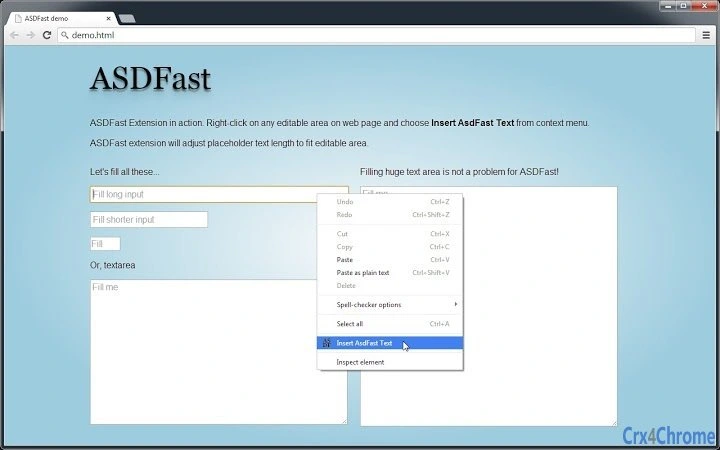
AsdFast Text is a lightweight browser extension designed to streamline content creation workflows for web developers and designers. By integrating directly into the right-click context menu, it allows users to instantly replace placeholder text—such as Lorem Ipsum—with custom or generated content. This tool eliminates the need for manual text input during prototyping, mockup design, or rapid development phases. The extension operates entirely within the browser environment, making it accessible across multiple platforms without requiring installation of additional software.
It targets professionals working in web development, UI/UX design, and front-end engineering who frequently need to populate forms, text fields, or layout containers with realistic placeholder content. The tool is particularly useful during early-stage design iterations where actual content is not yet available. Its open-source nature, hosted on GitHub, indicates transparency and community-driven development, which may appeal to developers who value code accessibility and customization.
Usage scenarios include filling out form inputs during wireframing, populating mockups with representative text, or testing layout responsiveness with varying text lengths. The extension does not alter the original page structure, ensuring safe and reversible interactions. The developer did not provide additional system requirements.
Key Features & Capabilities
- Context Menu Integration – Access the tool directly from any editable field by right-clicking, reducing workflow interruptions.
- One-Click Text Replacement – Instantly fills selected placeholders with generated content without requiring navigation to external tools.
- Open-Source Codebase – Available on GitHub, allowing developers to inspect, contribute, or modify the extension for custom needs.
- Lightweight Design – At just 1.2 MB, the extension imposes minimal impact on browser performance and load times.
- Multi-Platform Support – Compatible with Windows, Mac, and Linux operating systems through browser-based deployment.
For example, during a design sprint, a UI developer can right-click a text input field, select "Insert AsdFast Text," and immediately see realistic placeholder content appear. This reduces time spent on repetitive typing and enhances consistency across mockups. The open-source model encourages trust and adaptability, enabling advanced users to tailor the text generation logic to specific project needs. The extension does not generate content based on user input or context, but rather provides a consistent placeholder output.
User Interface, Workflow & Performance
The user interface is minimal and context-driven, relying entirely on the browser’s native right-click menu. There are no additional panels, pop-ups, or settings screens, which keeps the experience clean and distraction-free. Navigation is intuitive: users simply locate an editable element on a webpage, right-click, and select the extension’s function from the menu.
Workflow efficiency is high, as the process requires only two actions—right-click and select—making it ideal for rapid prototyping. The extension does not require configuration or login, reducing friction for first-time use. Performance is expected to be smooth, given its small size and lack of background processes. However, exact performance details were not specified.
Stability appears to be consistent with standard browser extensions, though real-world testing data was not provided. The developer did not specify resource usage details, such as CPU or RAM consumption. Users can expect minimal overhead, typical of lightweight extensions. No crashes or bugs were reported in the public repository at the time of release.
Compatibility & System Requirements
AsdFast Text is compatible with Windows, Mac, and Linux operating systems, provided the user is running a modern web browser with support for Chrome extensions. The extension has a file size of 1.2 MB and is designed to work seamlessly across desktop environments.
Exact system requirements were not listed. The developer did not specify minimum browser versions or hardware specifications. Compatibility with specific browsers (e.g., Chrome, Firefox) was not confirmed in the provided data. Platform compatibility information is limited to OS support, with no details on browser-specific functionality.
Pros and Cons
Pros
- Lightweight at just 1.2 MB, ensuring minimal impact on browser performance.
- Simple, intuitive workflow with no setup or configuration required.
- Open-source nature promotes transparency and community involvement.
- Direct integration into the right-click context menu enhances usability.
- Free to download and use with no licensing restrictions.
Cons
- Functionality is limited to text replacement without customization options.
- No built-in settings or preferences for users to adjust output.
- Exact browser compatibility details were not provided.
- Dependent on external web pages having editable fields for use.
- Limited to placeholder text generation; not suitable for content creation.
FAQ Section
Is AsdFast Text compatible with all browsers?
Compatibility information is limited. The extension is designed for browsers that support Chrome extensions and is available on Windows, Mac, and Linux. Specific browser support was not confirmed.
Is the extension safe to use?
Yes, the extension is open-source and hosted on GitHub, allowing users to review the code for security. It operates within the browser’s sandbox environment and does not collect user data.
How often are updates released?
Update frequency is not specified. As an open-source project, updates depend on community contributions and developer activity.
Can I modify the extension’s behavior?
Yes, since the code is open-source, developers can fork, modify, and redistribute the extension for personal or project-specific needs.
Does the extension work offline?
The extension functions within the browser environment and does not require an internet connection to replace placeholder text. However, initial installation may require online access.
Final Thoughts + CTA
AsdFast Text delivers a focused, no-frills solution for web developers and designers seeking a quick way to populate editable fields with placeholder content. Its minimal design, open-source foundation, and seamless integration into the right-click menu make it a valuable addition to any prototyping toolkit. While it lacks advanced customization, its simplicity ensures reliability and speed.
For professionals working in web development, UI/UX, or front-end design, this tool offers a practical shortcut that reduces repetitive typing and accelerates workflow. It’s especially useful in fast-paced environments where time efficiency is critical.
Download AsdFast Text now to streamline your content placeholder workflow and boost productivity.
Guides & Tutorials for ASDFast Extension for Chrome
How to install ASDFast Extension for Chrome
- Click the Preview / Download button above.
- Once redirected, accept the terms and click Install.
- Wait for the ASDFast Extension for Chrome download to finish on your device.
How to use ASDFast Extension for Chrome
This software is primarily used for its core features described above. Open the app after installation to explore its capabilities.
User Reviews for ASDFast Extension for Chrome 0
No reviews found





